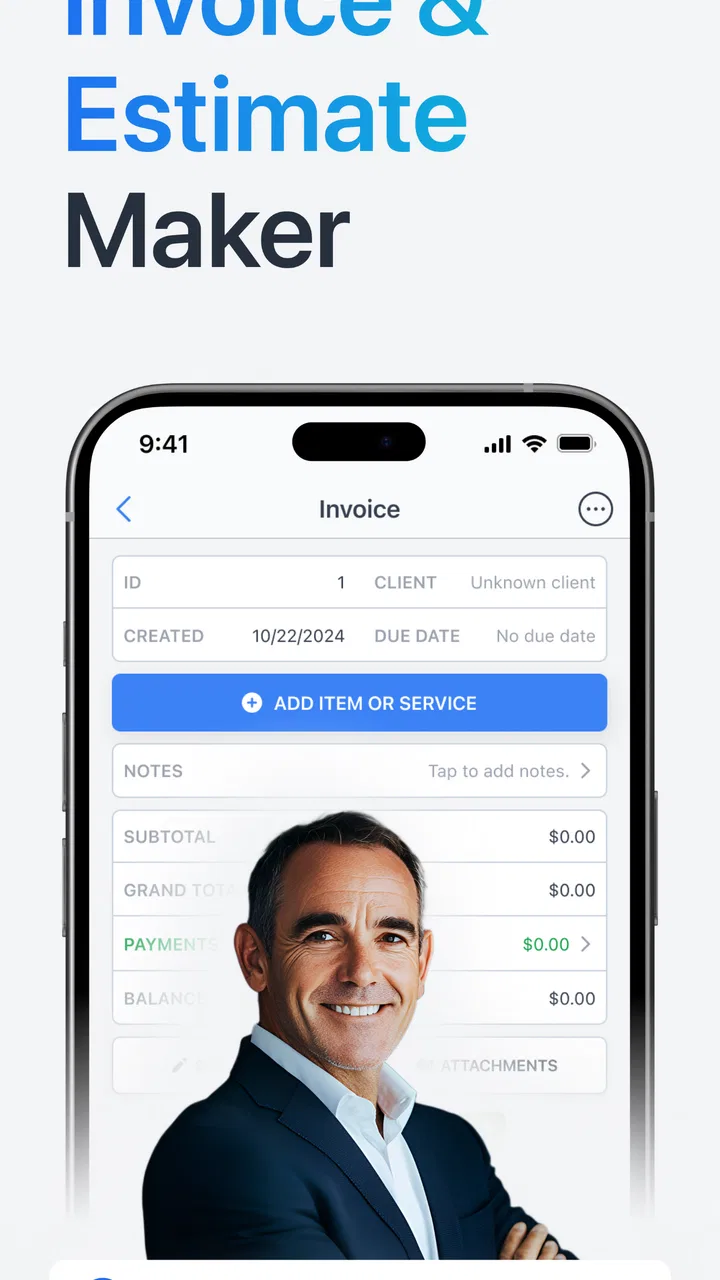
ProBooks: Invoice Maker
- 4.7
- Rating
- 100.00K
- Installs
- Free
- Price

 Analysis by App-foxy
When I test an invoice app, I am less interested in how polished the first screen looks than in what happens when a customer is waiting, a job has just finished, and I need to send a clear bill without opening a laptop. That is where ProBooks: Invoice Maker makes its case. It is a free business app from Brian Augsburger, built around a straightforward promise: create professional invoices, send them, and keep everyday billing more organized.
My main focus here is its invoice-making workflow, because that is the part that determines whether this app is genuinely useful or merely another form builder. In my experience, the value is not just producing a document. It is having a repeatable way to turn completed work into something a customer can understand and act on. For a freelancer, repair worker, consultant, tutor, or small service business, that reduction in friction can matter more than a long list of advanced business tools.
The app sits in the business category and is available for Everyone. It has been around since Mar 4, 2013, and its current version is 10.98. That long presence gives it a more established feel than a brand-new billing utility, while the 4.7 average from around 2.7 thousand ratings suggests that many users find the central workflow dependable. It has also passed over 100 thousand installs, so this is not an obscure experiment.
You May Also Like

 Blood Strike: 2.5 Anniversary
Blood Strike’s Loadouts Turn Every Drop Into a Tactical Gamble
A close look at Blood Strike’s custom loadouts: how fast access to signature weapons reshapes its battle royale rhythm, rewards preparation, and narrows the gap between fights.

 Pandora - Music & Podcasts
Pandora’s Music Is Easy to Start, but Harder to Recover
Pandora’s strength is its low-effort path from a seed to a station. Its weak spot is how much confidence it asks you to place in connection, setup, and quiet recovery.

 8 Ball Pool
8 Ball Pool Is Built on Rivalries, Rematches, and Routine
A close look at the rivalries, rematches, shared routines, and unanswered safety questions that turn a quick pool match into a persistent mobile community.

 Samsung Music
Samsung Music’s Quiet Strength Is Playing What You Already Own
Its reach comes less from spectacle than from dependable access to a personal library. That simplicity is both the app’s strongest retention engine and its ceiling.

 AccuWeather: Weather Radar
AccuWeather Review: A Quick, Clear Forecast for Everyday Decisions
For everyday plans, the best forecast is the one you can understand quickly. AccuWeather makes rain timing, radar, and local conditions easy to act on, with a few trade-offs.

 Hill Climb Racing
Why Hill Climb Racing Still Turns Crashes Into One More Run
A tiny car, a bumpy hill and one more upgrade: Hill Climb Racing keeps resurfacing because its simple chaos makes every near-miss feel personal.
More From Our News Desk



Why the invoice workflow is the real strength
The strongest idea behind ProBooks is concentration. Instead of asking a small operator to learn a broad accounting platform, it keeps attention on the document that usually needs to leave the business first: the invoice. That makes it easier to approach when the immediate task is simple but time-sensitive.
I see the app being most helpful for people who bill for individual jobs rather than managing a large inventory operation. Imagine a photographer finishing a small event, a handyman completing a repair, or a language tutor wrapping up a month of lessons. Each person needs to describe work, record an amount, identify the customer, and send a bill that looks sufficiently professional. A focused invoice maker can handle that moment without forcing the user to build an entire accounting system around it.
The practical benefit is consistency. When invoices are created from the same mobile workflow, customers are less likely to receive a hurried message with incomplete details or a handwritten total that is difficult to track later. I would not describe this as a replacement for every financial tool, but I do consider it a useful front door for getting billing under control.
That distinction is important. ProBooks is not automatically the best choice for a company that needs payroll, detailed tax reporting, purchase orders, inventory valuation, or deep collaboration between several departments. Those needs usually point toward a full accounting platform. The app makes more sense when the problem is repeated invoicing and basic organization, not comprehensive financial management.
Creating a bill without turning it into an accounting project
In a normal workflow, I would start by preparing the customer and work details before worrying about presentation. The useful habit is to treat every invoice as a small record of what happened: who received the service, what was delivered, how much each part cost, and what the customer should do next. Entering information in that order reduces the chance of sending an attractive but vague document.
The app's appeal comes from keeping that process approachable on a phone. A mobile invoice is especially valuable when the work happens away from a desk. A contractor can deal with billing while still at the customer's location, and a self-employed professional can prepare the document during a gap between appointments. That immediacy is more than convenience: it shortens the delay between finishing work and formally requesting payment.
I recommend using descriptive line items rather than broad labels. “Repair” tells a customer very little, while a clearer description explains the task and makes later questions easier to answer. This is one of the less obvious ways to get more from a simple invoice app: the quality of the information you enter affects trust just as much as the app's layout.
Another useful approach is to separate services that customers may understand differently. If a job includes labor and materials, recording them distinctly can make the total easier to review. It also gives you a better reference when a customer asks why the amount changed from an earlier estimate. ProBooks can be useful here because it encourages a structured invoice rather than an informal payment request.
What sending an invoice changes in everyday work
Sending the bill immediately after a job creates a cleaner boundary between delivery and payment. In a small business, the owner is often the salesperson, worker, scheduler, and bookkeeper at the same time. A dedicated invoice workflow does not remove those responsibilities, but it can stop billing from becoming the task that is postponed until the end of the week.
I found this especially relevant for irregular work. Someone who completes only a few jobs each week may not need a complex subscription-based accounting suite, yet still needs a reliable way to remember what was billed. A focused app can serve as a practical middle ground between scattered notes and a full desktop finance package.
There is also a communication advantage. A formal invoice gives the customer a single reference for the service, amount, and payment request. That is better than sending several chat messages that the customer must reconstruct later. When a question comes up, both sides have a clearer document to discuss.
Still, I would not assume that sending an invoice means the payment process is fully automated. The app's purpose is to help create and send the bill; your customer relationship, payment method, reminders, and record-keeping habits still matter. If your business depends on automatic collections, recurring billing, or a detailed accounts-receivable system, you should compare ProBooks carefully with tools designed specifically for those jobs.
How I would use it in a real workday
Consider a mobile cleaner who finishes a recurring home visit in the afternoon. Before leaving, they can prepare an invoice while the details are fresh instead of relying on memory later. The line items might distinguish the cleaning service from an extra task, making the total easier for the customer to understand. The invoice can then be sent while the interaction is still current.
The important improvement is not that the cleaner has discovered a new accounting method. It is that the billing step has been attached to the end of the job. That connection makes missed invoices less likely and gives the business a more professional rhythm. If the cleaner waits several days, the risk is not only forgetting to bill; it is also forgetting which additional work was requested and when it was completed.
I would use a similar process for freelance design. After delivering a logo or a set of revisions, I would create an invoice with separate descriptions rather than a single unexplained total. If the customer later asks about the scope, the document becomes a useful reminder of what was included. This is a small workflow choice, but it turns the invoice into a record instead of merely a payment demand.
For tradespeople, mobile access can be even more practical. A job may be completed in a garage, workshop, garden, or office where a computer is inconvenient. Preparing the bill at the point of completion can reduce the pile of administrative work waiting at night. I would still review every amount before sending, especially when materials or optional tasks are involved.
A better routine than sending bills whenever you remember
My recommended routine is simple. First, finish the work description while the details are fresh. Second, check the customer information and total. Third, read the invoice as if you were the recipient: is it obvious what was done and what amount is requested? Only then send it. This short pause catches ambiguous wording and accidental omissions that are easy to miss when rushing.
For people who invoice several customers, I would also create a regular review habit. At the end of each workday, look back at completed jobs and confirm that each one has either been invoiced or deliberately held for a clear reason. The app can support a more organized process, but it cannot know that a job happened if you never record it.
A less obvious trade-off is that convenience can encourage premature billing. Sending an invoice quickly is useful, but speed should not replace accuracy. If a project has changing scope, uncertain expenses, or approval still pending, it may be better to confirm the final details first. ProBooks helps with the document; judgment is still required before the document goes out.
Where it compares well with familiar alternatives
The usual alternatives are a word processor, a spreadsheet, handwritten bills, email templates, or a full accounting service. A word processor may produce a nice-looking document, but it often leaves you rebuilding the same structure repeatedly. A spreadsheet can calculate totals, yet it may feel awkward when the goal is to prepare and send a customer-facing invoice from a phone.
Handwritten invoices are fast in the moment but harder to search, copy, and keep consistent. Email-only requests are even more fragile because the payment details can get buried in a conversation. ProBooks occupies the useful space between those informal methods and heavyweight financial software: more structured than a message, less intimidating than a broad accounting suite.
A full accounting platform is the stronger option when you need connected expenses, tax workflows, inventory, payroll, bank reconciliation, or several users working from the same financial records. It may also be preferable if your accountant expects a particular export or if your business has complex reporting obligations. ProBooks is better suited to the person who wants to issue clear invoices without adopting a much larger system.
That comparison also explains why the app may feel limited to an established company. A small team can outgrow a simple invoice-centered workflow once it needs approval chains, detailed customer histories, or a unified view of income and expenses. I would start with ProBooks when billing is the main pain point, not assume it will remain the only business app needed forever.
Costs, upgrades, and the free starting point
ProBooks is free to use as its listed price, which makes it easy to test without committing money at the beginning. There are in-app purchases ranging from $2.99 to $149.99 per item, so I would inspect the upgrade screen carefully before relying on any paid option. The wide range suggests that different additions or packages may be aimed at different levels of use, and a casual user should not assume every capability belongs to the free experience.
My advice is to begin with a small, realistic trial. Create the kinds of invoices you actually send, check whether the workflow fits your phone habits, and see whether the resulting documents are clear enough for your customers. Only consider spending money after you know which limitation is affecting your work. This avoids paying for extras that do not solve your particular problem.
For a person sending occasional invoices, the free entry point may be all that is needed. For someone billing frequently, the decision should be based on saved time and reduced mistakes rather than on the existence of an upgrade alone. If a paid feature does not improve your daily process, it is not automatically worthwhile.
Trade-offs I noticed before recommending it
The first limitation is scope. An invoice maker can organize billing, but it should not be confused with a complete bookkeeping system. You may still need another method for tracking expenses, setting aside money for taxes, monitoring unpaid balances, or preparing formal financial reports. That is not a flaw in the central idea, but it matters when choosing one app for an entire business.
The second is data discipline. A simple tool is only as reliable as the entries you maintain. If customer names are inconsistent, descriptions are vague, or invoices are created days after the work, the app cannot restore the missing context. I would establish a naming convention from the start and use specific service descriptions so later searches and conversations remain understandable.
The third is the mobile trade-off. A phone is excellent for quick billing, but a small screen is not ideal for reviewing a long project with many line items. For complex invoices, I would prepare carefully, check the total twice, and consider whether a larger-screen accounting solution would be more comfortable. ProBooks is strongest when the invoice is relatively focused and the user values speed.
There is also a professional judgment issue around customization. Some clients expect purchase-order references, industry-specific fields, detailed tax presentation, or a particular invoice format. Before moving all billing into the app, I would send a sample to a trusted customer or colleague and confirm that it contains what your clients expect. A clean general invoice is not necessarily sufficient for every industry.
Finally, I would not choose it solely because it has a strong average rating. The 4.7 average is encouraging, but ratings cannot tell me whether the workflow fits a particular business. A solo service provider and a company with multiple billing staff may have completely different requirements. The right question is whether its focused approach matches the way you work.
Who benefits most from this focused approach
I would recommend ProBooks first to freelancers, independent contractors, local service providers, and very small businesses that need to produce invoices regularly but do not want a complicated accounting setup. It is particularly appealing if you work away from a desk, bill after individual jobs, and often postpone administrative tasks until they become urgent.
It can also suit someone moving away from informal billing. If you currently use notes, text messages, or a reusable document and want a more consistent process, a dedicated invoice app is a sensible step. The key gain is not sophistication; it is repeatability. Once the same basic workflow becomes routine, billing takes less mental effort.
I would be more cautious for a growing company with several people creating invoices, a business that sells physical products with changing stock, or anyone who needs accounting and tax records in one connected system. Those users may be better served by a broader platform, even if it takes longer to learn. Choosing a smaller tool for a larger problem usually creates extra work later.
People who dislike entering details on a phone should also test it honestly. The app is designed around mobile convenience, but that does not make every long invoice pleasant to prepare on a small screen. If your work involves short, repeatable services, that is less of an issue. If every project has many custom items, a desktop-oriented alternative may save more time.
My final view after using it as a billing companion
What I like most about ProBooks is that it treats invoicing as a practical daily action rather than burying it inside an oversized business system. The free starting point lowers the barrier, the Everyone age rating keeps it broadly accessible, and the app's long availability gives it a reassuringly established place among mobile business tools.
I would recommend it to a friend who says, “I finish the work, then forget to send the bill.” Its best effect is helping connect those two moments. Prepare the invoice while the job is still clear in your mind, describe the work properly, review the amount, and send it through a consistent process. That habit can make a small operation feel more organized without demanding a full accounting overhaul.
My recommendation comes with one condition: choose it for focused invoicing, not for every financial responsibility your business may have. Keep a separate plan for expenses, taxes, payment follow-up, and any industry-specific records you need. If those requirements are modest, ProBooks can be a practical and approachable billing tool. If they are central to your operation, compare it with a complete accounting service before committing.
Overall, I see ProBooks: Invoice Maker as a useful middle ground: more dependable and presentable than improvised bills, but simpler than a full business finance suite. For the right user, that simplicity is the feature. It keeps the attention on creating a clear invoice at the moment it is needed, and that is often the small improvement that makes the biggest difference to everyday cash flow.
FAQs for ProBooks: Invoice Maker
01What is ProBooks: Invoice Maker used for?
ProBooks: Invoice Maker is designed for freelancers, independent professionals, contractors, and small businesses that need to create and manage invoices from a mobile device. After setting up your business details, you can add customers, list products or services, apply taxes or discounts, and generate professional-looking invoices without relying on complicated accounting software.
02Can I create and send professional invoices from my phone?
Yes. The app lets you prepare invoices directly on your Android or iOS device and customize important information such as your business name, contact details, customer information, invoice number, due date, items, prices, taxes, and payment terms. Completed invoices can generally be shared with clients through available messaging, email, or file-sharing options on your device.
03Does ProBooks: Invoice Maker support estimates, receipts, or expense tracking?
The available tools may extend beyond basic invoice creation, depending on the version of the app and your subscription plan. Users should check whether their installation includes estimates, receipts, expense records, payment status tracking, or sales summaries. These features can be useful for organizing day-to-day business activity, but the app should not automatically be treated as a complete bookkeeping or tax-accounting system.
04Is ProBooks: Invoice Maker free to download and use?
ProBooks: Invoice Maker may be available as a free download, but some functions can be restricted by in-app purchases, subscriptions, advertising, or plan limits. Before creating a large number of invoices, review the pricing information shown in the App Store or Google Play listing. Pay particular attention to recurring subscription terms, trial periods, export restrictions, and any limits on templates or business records.
05Is my financial and customer information safe in ProBooks: Invoice Maker?
Because invoice applications can contain customer names, addresses, prices, payment details, and business information, privacy should be considered before regular use. Review the app’s privacy policy, requested permissions, backup options, and data-sharing practices. Avoid entering sensitive payment credentials unless the app clearly explains how they are protected, and keep your device secured with a passcode or biometric lock.
Pros
- Creates professional invoices quickly from your phone.
- Useful templates help maintain a consistent business appearance.
- Supports organized customer and product information.
- Saves time for freelancers and small business owners.
- Convenient for sending invoices while away from the office.
Cons
- Some advanced features may require a paid subscription.
- Customization options can be limited in certain templates.
- Not ideal for complex accounting or inventory management.
- Small screens can make detailed invoice editing less convenient.
- Requires careful backup management to avoid losing business records.

ProBooks: Invoice Maker
Gallery